Eyewear Virtual Try-On for Glasses & Sunglasses Stores
Shoppers try your frames live on camera, in the browser, with no app to download. The frames track the face in real time, and the 3D models are built from the product photos you already have.
Free Starter plan: 25 try-on sessions a month and 3 AI-built 3D frames.
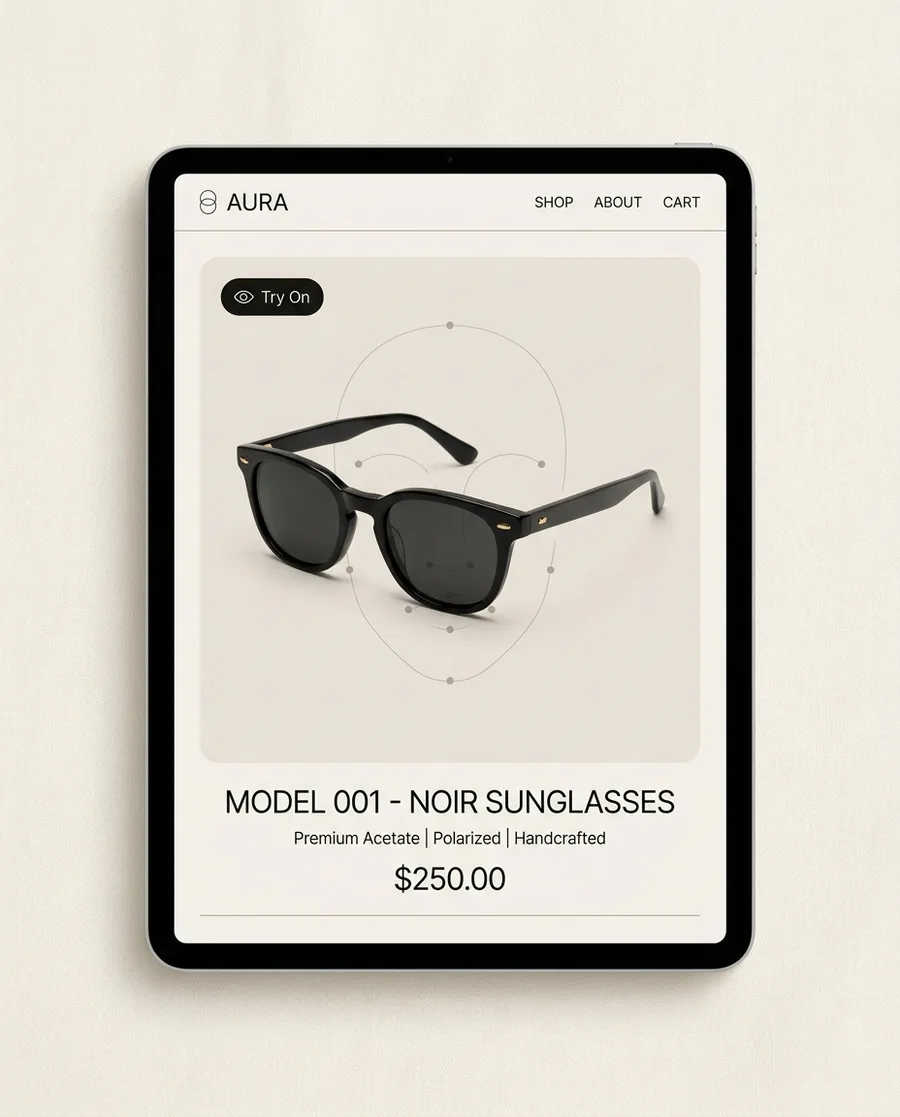
What is eyewear virtual try-on software?
Eyewear virtual try-on software lets online shoppers see glasses and sunglasses on their own face through a phone or laptop camera before they buy. TryOn Virtual tracks 468 points on the face in real time, sits each frame on the nose bridge, moves the temple arms with head angle, and renders lenses with physically based materials, so tints, gradients, and mirror coatings look real. It runs in the browser with no app download, and camera frames never leave the shopper’s device. Each frame needs a 3D model, which the built-in builder generates from up to 4 product photos, typically in under five minutes. Merchants install it as a Shopify app, add a script embed on WooCommerce or Magento, or connect a custom store through the REST API. The Starter plan is free, with 25 try-on sessions a month and 3 AI-built 3D frames.
Conversion, returns, and engagement figures: TryOn Virtual merchant data.
How it works for eyewear stores in four steps
Pick up to 4 product photos
Use the catalog shots you already have — front, side, and 45° angles work best. JPEG, PNG, or WebP.
AI builds the 3D frame
The eyewear 3D model builder reconstructs the frame and bakes its materials, typically in under five minutes.
Check the fit
Preview the frame on a reference head or on your own face through your webcam, and fine-tune position, rotation, and scale before going live.
Go live on the product page
The Try On button appears on the product page. Shoppers open their camera and the frames track their face in real time.
What shoppers see when they try on frames
The question every eyewear shopper has is “will these suit my face?” Each part of the try-on is built to answer it.
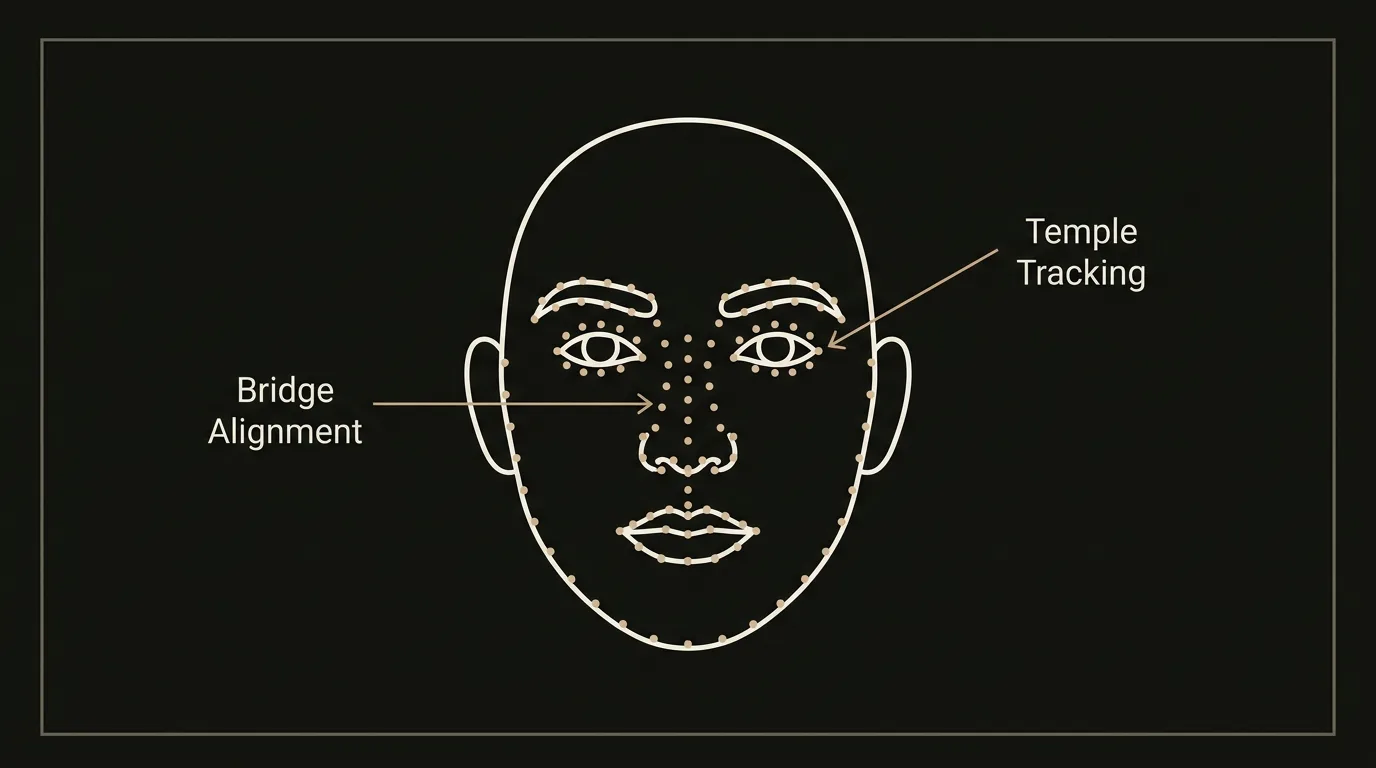
Frames that sit on the nose bridge
A 468-point face mesh places the frame on the bridge and aligns it with the eyes and ears, then keeps it there as the shopper moves, so they judge the frame on their real face shape.
- Nose bridge alignment
- Follows head position and depth
Arms that move like real glasses
The temple arms respond to head angle. When a shopper turns to check their profile, the arms follow the side of the head instead of floating in front of it.
- Head-angle responsive temples
- Profile views that look right
Tints, gradients, and mirror coatings
Physically based rendering with HDR environment maps gives lenses believable reflections and color, including gradient tints and mirror coatings on sunglasses.
- Tinted, gradient, and mirror lenses
- Clear optical lenses
Switch frames without starting over
Shoppers can try related styles in the same session, compare frames side by side, and take a screenshot to decide later or share with a friend.
- Side-by-side frame comparison
- Screenshot and share
3D frames without a 3D studio
Generate 3D frames from your product photos
Real-time AR needs a 3D model of every frame, and that used to mean a 3D studio and a multi-week turnaround. The built-in pipeline takes up to 4 ordinary product photos, then handles alignment, background removal, geometry reconstruction, material baking, and mobile optimization on its own. Models typically finish in under five minutes and go live in the try-on widget. See how the eyewear 3D model builder works.
Or upload the models you already have
If your frame supplier provides 3D files, upload them: GLB is recommended, and GLTF, USDZ, SPZ, and PLY are accepted. Each upload gets an automatic check for polygon count, texture size, and material compatibility. Paid plans include AR optimization for your own assets.
3D viewer and try-on in one
Each frame is a real 3D model rendered live over the camera feed in the shopper’s browser, at up to 60fps on mid-range phones. You don’t need separate 3D viewer software for eyewear plus a separate AR app: one widget handles the model, the rendering, and the live try-on.
Eyewear try-on plugin options by platform
It’s the same production widget everywhere. Only the install method changes.
Shopify app + theme block
Install from the Shopify App Store, build or upload your frames, and add the TryOn block to your product template. Works with every Shopify 2.0 theme with no code. Step-by-step guide: how to add eyewear try-on to Shopify.
Shopify setupScript embed, no plugin
Paste a short script and a Try On button into your WooCommerce product template. There is no WordPress plugin to install or keep patched, and products are managed in the merchant panel.
WooCommerce guideEmbed + REST API
Magento, headless, and custom storefronts use the same embed. Sync your frame catalog with the REST API, using your own product IDs if you like.
Virtual try-on APIEyewear try-on: TryOn Virtual vs Fittingbox
Fittingbox is the eyewear-only veteran with more than 20 years in the category. Here is how the two compare for an online eyewear store.
| TryOn Virtual | Fittingbox | |
|---|---|---|
| Eyewear depth | Live AR face tracking + AI 3D models from photos | Category veteran — 195k+ frames, PD tool |
| Pupillary-distance (PD) measurement | Not offered | Yes |
| Category coverage | Eyewear, watches, jewelry, clothing, shoes | Eyewear only |
| Try-on modes | Real-time AR + AI photo-swap | Real-time AR (eyewear) |
| Published pricing | $0 / $15 / $49 / $149 / Custom | $59 / $99 / $199 per month |
| Free tier | Yes — $0 Starter, 25 sessions/mo | 14-day free trial |
| Platforms | Shopify, WooCommerce, custom + REST API | Shopify, WooCommerce, Magento, WordPress |
Fittingbox details from its public site and Shopify App Store listing (pricing verified September 2026). Always confirm on the vendor’s own page. Full breakdown: TryOn Virtual vs Fittingbox.
Which should you choose?
If you sell eyewear only and need the deepest frame library, PD measurement, and in-store hardware, Fittingbox is the veteran to beat. Choose TryOn Virtual if you want to start free instead of on a trial clock, build 3D frames from your own photos, or sell other categories such as watches and jewelry alongside glasses.
A note for prescription and optical retailers
Try-on is a style and fit preview. It shows how a frame’s shape, size, and color look on the shopper’s face, and it works for optical frames as well as sunglasses. It does not measure pupillary distance, read a prescription, or replace an eye exam. Keep lens width, bridge, and temple measurements on the product page, and collect PD the way you do today.
Pricing for eyewear catalogs
25 try-on sessions / month
3 free AI-built 3D models for AR try-on
150 try-on sessions / month
5 free AI-built 3D models for AR try-on
500 try-on sessions / month
10 free AI-built 3D models for AR try-on
2,500 try-on sessions / month
100 free AI-built 3D models for AR try-on
Unlimited try-on sessions
Unlimited AI-built 3D models for AR try-on
Plans are priced by try-on sessions, not frame count, so try-on covers your whole catalog. The free 3D models per plan decide how many frames you can build from photos before overage applies. Paid tiers include a 7-day free trial. See all plans and overage rates.
Eyewear try-on questions
Is there a virtual eyewear try-on plugin for Shopify and WooCommerce?
Yes. On Shopify it is an app from the Shopify App Store plus a theme block you add to your product template, with no code. On WooCommerce it is a script embed rather than a WordPress plugin: you paste a short script and a Try On button into the product template. Magento and custom storefronts use the same embed.
Do I need 3D models of my frames?
Live AR needs one per frame, but you don’t have to make them. Upload up to 4 product photos and the 3D model builder generates the frame, typically in under five minutes. If you already have GLB, GLTF, USDZ, SPZ, or PLY files, you can upload those instead.
Does it measure pupillary distance (PD) or frame size?
No. TryOn Virtual shows how a frame looks and sits on the shopper’s face, but it does not measure PD and it is not a substitute for an eye exam or a fitting. Keep frame measurements (lens width, bridge, temple length) on the product page. If PD measurement is a hard requirement, Fittingbox offers it.
Does it work for prescription frames and sunglasses?
Yes. It works for optical frames, prescription glasses, and sunglasses. Clear lenses, tints, gradients, and mirror coatings all render, so optical retailers and fashion eyewear brands use the same setup.
Is the shopper’s camera feed uploaded anywhere?
No. Eyewear try-on runs entirely in the shopper’s browser. Camera frames and face-tracking data stay on the device, are never sent to our servers, and are discarded when the session ends.
Can shoppers compare several frames in one session?
Yes. Related styles can be offered inside the same try-on window, so a shopper can switch between frames without closing the camera, compare them side by side, and take a screenshot of the ones they like.
How much does eyewear virtual try-on cost?
The Starter plan is free with 25 try-on sessions a month and 3 AI-built 3D models. Essentials is $15/month (150 sessions, 5 models), Growth is $49/month (500 sessions, 10 models), and Scale is $149/month (2,500 sessions, 100 models), each with a 7-day free trial. Pricing is per session, so frame count doesn’t change your plan.
Will it slow down my store?
No. Product pages load only a small bootstrap script for the Try On button. The 3D engine, frame model, and face-tracking code load after a shopper taps Try On, so initial page load and Core Web Vitals are unaffected.
Let shoppers try every frame
Build your first 3D frames from photos for free, and go live on Shopify or your own store today.